本文是 Building Filesystem Agents 的阅读笔记
现代大语言模型已经高度适应了“文件 + 目录 + Shell”的工作方式。
通常来说,Agent 的上下文要么直接塞提示词,要么用向量搜索,但提示词填充有上限而向量搜索需要从结构化数据中提取特征值,均存在局限。
而文件系统 Agent 则提供了一种折中方案:将数据以文件形式进行组织,并允许 Agent 使用 Bash 工具(如 find、grep、cat、rg 等),模型就可以复用它在代码导航中已经非常成熟的能力来理解、搜索、关联和修改数据,而无需学习额外的数据库 Schema、SQL 或复杂 API。
文件系统不仅仅是一种存储方式,而是一种与 Agent 工作方式高度契合的数据组织模型:
- 结构即层级:目录和文件本身就是层级关系,不需要额外设计 Schema 或 Metadata 来恢复实体之间的关联。
- 精确检索而非语义相似:grep、find、rg 等工具基于确定性的字符串或路径匹配,适合查找具体事实、标识符和精确文本,而不是依赖语义相似度。
- 上下文按需加载:Agent 通过 Shell 工具逐步定位需要的信息,只把真正相关的内容送入模型,而不是预先加载整个知识库。
- 可调试、可审计:每一步操作(执行了哪些命令、读取了哪些文件、为什么得到最终答案)都是可观察、可复现的。这一点与代码开发的调试体验一致,也是许多现代 Code Agent 选择 Filesystem + Bash + LLM 架构的重要原因。
Agent 循环
sequenceDiagram
    participant 用户
    participant Agent as ToolLoopAgent
    participant LLM as 大语言模型
    participant Bash

    用户->>Agent: 有人提到 pricing 吗?

    Agent->>LLM: 用户问题

    LLM->>Agent: 调用 bashTool

    Agent->>Bash: grep -r "pricing" calls/

    Bash-->>Agent: 匹配结果

    Agent->>LLM: 工具执行结果

    alt 需要更多上下文
        LLM->>Agent: 再次调用工具
        Agent->>Bash: cat / head / grep ...
        Bash-->>Agent: 更多内容
        Agent->>LLM: 工具执行结果
    else 信息已足够
        LLM-->>Agent: 最终回答
    end

    Agent-->>用户: 综合分析后的回答
sequenceDiagram
participant 用户
participant Agent as ToolLoopAgent
participant LLM as 大语言模型
participant Bash
用户->>Agent: 有人提到 pricing 吗?
Agent->>LLM: 用户问题
LLM->>Agent: 调用 bashTool
Agent->>Bash: grep -r "pricing" calls/
Bash-->>Agent: 匹配结果
Agent->>LLM: 工具执行结果
alt 需要更多上下文
LLM->>Agent: 再次调用工具
Agent->>Bash: cat / head / grep ...
Bash-->>Agent: 更多内容
Agent->>LLM: 工具执行结果
else 信息已足够
LLM-->>Agent: 最终回答
end
Agent-->>用户: 综合分析后的回答
创建简单的 Agent 循环
AI SDK 提供了一个 ToolLoopAgent 构造函数用来创建一个 agent 循环,只需要传入一个包含 model、instructions 和 tools 的对象即可。
import { ToolLoopAgent } from "ai";

const MODEL = "deepseek/deepseek-v4-pro";
const INSTRUCTIONS = `
You are a helpful assistant that answers questions about customer calls. Use bashTool to explore the files and find relevant information pertaining to the user's query. Using the information you find, craft a response for the user and output it as text.
`;

export const agent = new ToolLoopAgent({
  model: MODEL,
  instructions: INSTRUCTIONS,
  tools: {},
});
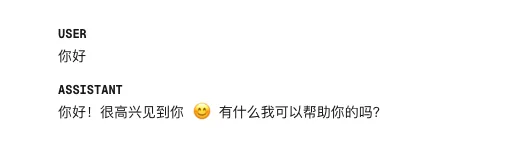
此时 Agent 已经可以正常响应输入了:
创建 Bash 工具
通过 AI SDK 提供的 tool 辅助函数构建一个能够创建 Bash 工具的函数。
tool 所需的参数包含:
description:提供对于工具的描述,让模型能够理解该工具能够干什么。inpuSchema:通过 zod 库来定义工具的输入类型,使用.describe()方法提供 LLM 所需的字段信息。execute:定义在工具被调用时的执行逻辑,这里调用sandbox.runCommand(command, args)方法返回在沙盒环境中的执行结果。
import { tool } from "ai";
import { z } from "zod";
import type { Sandbox } from "@vercel/sandbox";

export function createBashTool(sandbox: Sandbox) {
  return tool({
    description: `
      Execute bash commands to explore transcript and instruction files.
      Examples (not exhaustive): ls, cat, less, head, tail, grep
      `,
    inputSchema: z.object({
      command: z.string().describe("The bash command to execute"),
      args: z.array(z.string()).describe("Arguments to pass to the command"),
    }),
    execute: async ({ command, args }) => {
      const result = await sandbox.runCommand(command, args);
      const textResults = await result.stdout();
      const stderr = await result.stderr();
      return {
        stdout: textResults,
        stderr: stderr,
        exitCode: result.exitCode,
      };
    },
  });
}
连接到沙盒环境
通过沙盒环境,能够确保运行大模型的输出的指令时不发生破坏本地环境的操作。
@vercel/sandbox 提供了创建线上沙盒环境的能力,在 Vercel 生态中能够快速的接入。
import { ToolLoopAgent } from "ai";
import { createBashTool } from "./tools";
import { Sandbox } from "@vercel/sandbox";

const MODEL = "deepseek/deepseek-v4-pro";

const sandbox = await Sandbox.create();

export const agent = new ToolLoopAgent({
  model: MODEL,
  instructions: "",
  tools: {
    bashTool: createBashTool(sandbox),
  },
});
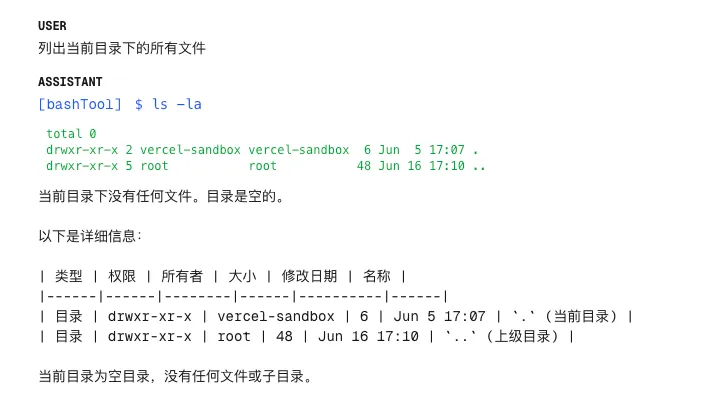
这时 Agent 能够正常调用 bashTool 工具进行命令执行了:
配置沙盒环境
通过 Sandbox.create() 创建的沙盒环境是一个空白的容器,需用通过 @vercel/sandbox 提供的文件上传能力将数据文件上传到沙盒中,Agent 才能基于这些文件进行回答。
async function loadSandboxFiles(sandbox: Sandbox) {
  const callsDir = path.join(process.cwd(), "lib", "calls");
  const callFiles = await fs.readdir(callsDir);

  for (const file of callFiles) {
    const filePath = path.join(callsDir, file);
    const buffer = await fs.readFile(filePath);
    await sandbox.writeFiles([{ path: `calls/${file}`, content: buffer }]);
  }
}
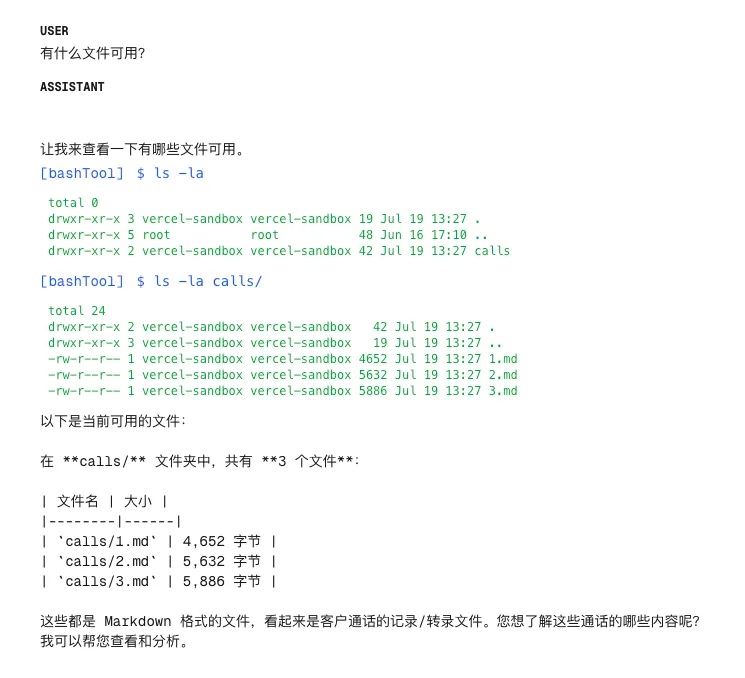
此时 Agent 能够查找到加载到沙盒中的所有文件了:
评论